A waitlist tells you who is next. It does not tell you where to put them.
That gap is where most Friday nights fall apart. The host knows who is waiting, the servers know which tables are about to open, and nobody can see both at once.
This update closes that gap, and puts more of the line in your guests' hands.
Table Maps: Your Whole Floor at a Glance
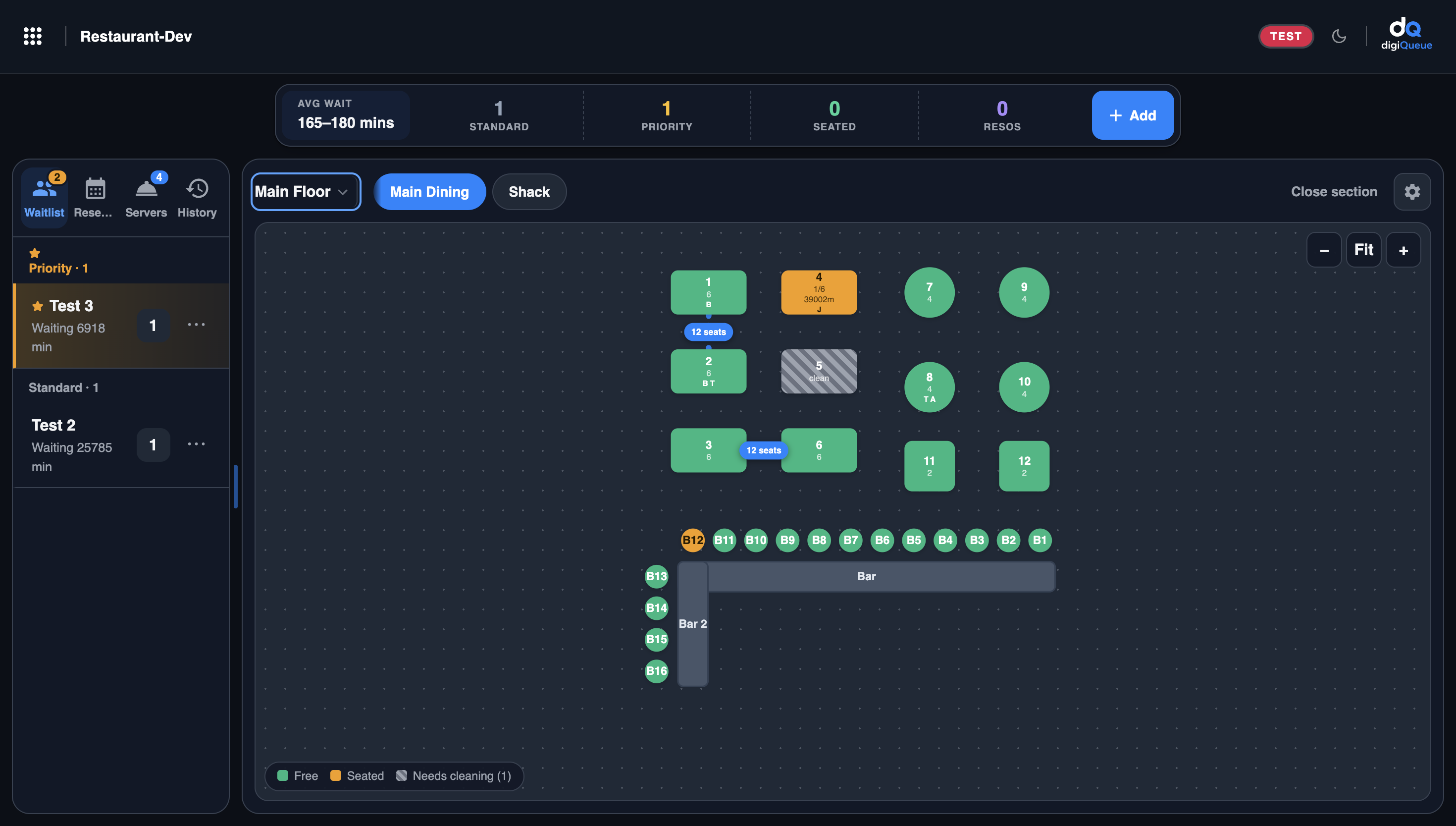
Turn on Restaurant Mode and Table Maps shows up in your queue settings. Lay out your dining room, bar, and patio the way your restaurant actually looks, then run the night from one screen.
- Seat straight from the map. Assign waitlist guests and reservations to tables in a tap. Every table shows its status by color: free, seated, or needs cleaning.
- See how long every table has been seated. Know which parties are wrapping up before anyone has to walk the floor.
- Combine and split tables. Push two six-tops together for a party of twelve, see the combined seat count, and split them back when they leave.
- Assign servers and keep it fair. Put servers on their sections and see how many tables each one has taken tonight, so the rotation stays even.
- Never seat a dirty table. Mark a table for cleaning the moment a party leaves. It stays off the board until it is ready.
The waitlist and the floor finally live in the same place.
Guests Can Upgrade Themselves
Priority used to start at the host stand. Now it can start in the guest's pocket.
Flip one switch in your new Pricing settings and guests already in the standard line can move to priority from their own live queue page. They see exactly where they would land, tap once, and pay securely through Stripe. No staff involved.
And you can reward patience instead of punishing it:
- Discount the longer they wait. Set steps like 10% off after 15 minutes and 25% off after 30. Guests see the original price crossed out next to their discount.
- All your pricing in one place. Price per person, surge pricing, refunds, and upgrades now live together under Settings → Pricing. Check any setting to pin it to Quick Settings on your dashboard.
The live queue page got a full redesign too: position, parties ahead, and estimated wait in a clean ticket-style layout guests can read in a glance.
Reservations Guests Can Manage on Their Own
The phone call that says "can we move to 8:00?" is optional now.
- Change or cancel from the confirmation page. Guests handle it themselves, and your book stays accurate.
- Add to calendar in one tap. The time and details land on their phone, so fewer guests forget.
- A redesigned confirmation pass. Status, party size, and booking time up top, plus a one-time check-in code to show the host.
"Now Serving," Front and Center
When a guest is called, they now appear at the top of the live queue view with their party size and a countdown that turns red in the final minute. Everyone in line can see whose turn it is and how much time is left.
Each queue can also show its own logo and name in the header, set in Queue Profile settings, so guests know they are in the right line.
New Plans, and a Calculator to Pick the Right One
Pricing should not take a sales call to understand. Choose the plan that fits how your line actually runs:
- Free. Start earning from your line on day one with no monthly fee.
- Pro: Fixed. One flat monthly rate with texts included and a bigger share of every priority pass.
- Pro: Pay As You Go. Pay only for the queues and texts you use.
The new pricing calculator does the math for you. Enter your monthly guests, how many buy priority, your average pass price, and how many queues you run. It shows your bill, what you keep, and which plan leaves the most money in your pocket, including the exact point where Pro starts paying for itself.
Once you are on a plan, Billing Info in your account settings shows your current plan, your share of every priority payment, and the texts and calls you have used this period. No surprises when the bill arrives.
Running more than one line? Add queues from Settings → Queues and manage them all from one list. Every queue gets its own settings, its own QR code, and its own revenue.
Light, Dark, or Match Your Device
The whole platform now comes in light mode, dark mode, and a mode that follows the device. It applies to your dashboard and every page your guests see, from the join screen to the reservation pass.
And the Revenue Layer for Platforms
Earlier this month, we opened the digiQueue Partner API. POS, booking, and venue platforms can plug paid priority straight into the software their clients already use, and everyone who touches the line gets paid. If you missed it, read The Revenue Layer Is Here or see everything at digiqueue.me/integrations.
See It for Yourself
Every update is live now. Current clients can walk through each feature, with screenshots, in the Updates tab of the Help page in your dashboard.
Not on digiQueue yet? Start free at digiqueue.me, or reach out at digiqueue.me/contact and we will set up your floor with you.